Design Patterns: Theme & Variation
Design patterns are common solutions for solving a specific problem. Think of a blueprint for building a chair. 4 legs, a seat and and back rest are the core components for the schematics of a standard chair. But even the chair pattern can have variations. A stool might have 3 legs, no back rest and a swivel seat. Indeed each overall design pattern has a sub-set of implementation patterns: eager versus lazy instantiation, inheritance or composition, and so on.
Making rice follows a basic recipe but imagine how a modern high end restaurant would make an elaborate complex rich dish versus a takeout restaurant with a rice steamer? Using a rich chicken stock adds body to the rice versus unsalted water and clumpy rice.
Picking the right pattern is the first step. Implementation details and fitting it into the codebase is the second step. That’s the fun creative part to the technical first part.
A lot of the code for GSAP animations is one-off example code.
Scroll Based Landing Page
After learning GSAP basics like tweens, timelines, SplitText and ScrollTrigger, I wanted to challenge myself to build a landing page and sprinkle in some GSAP text effects to see how it could be refactored.
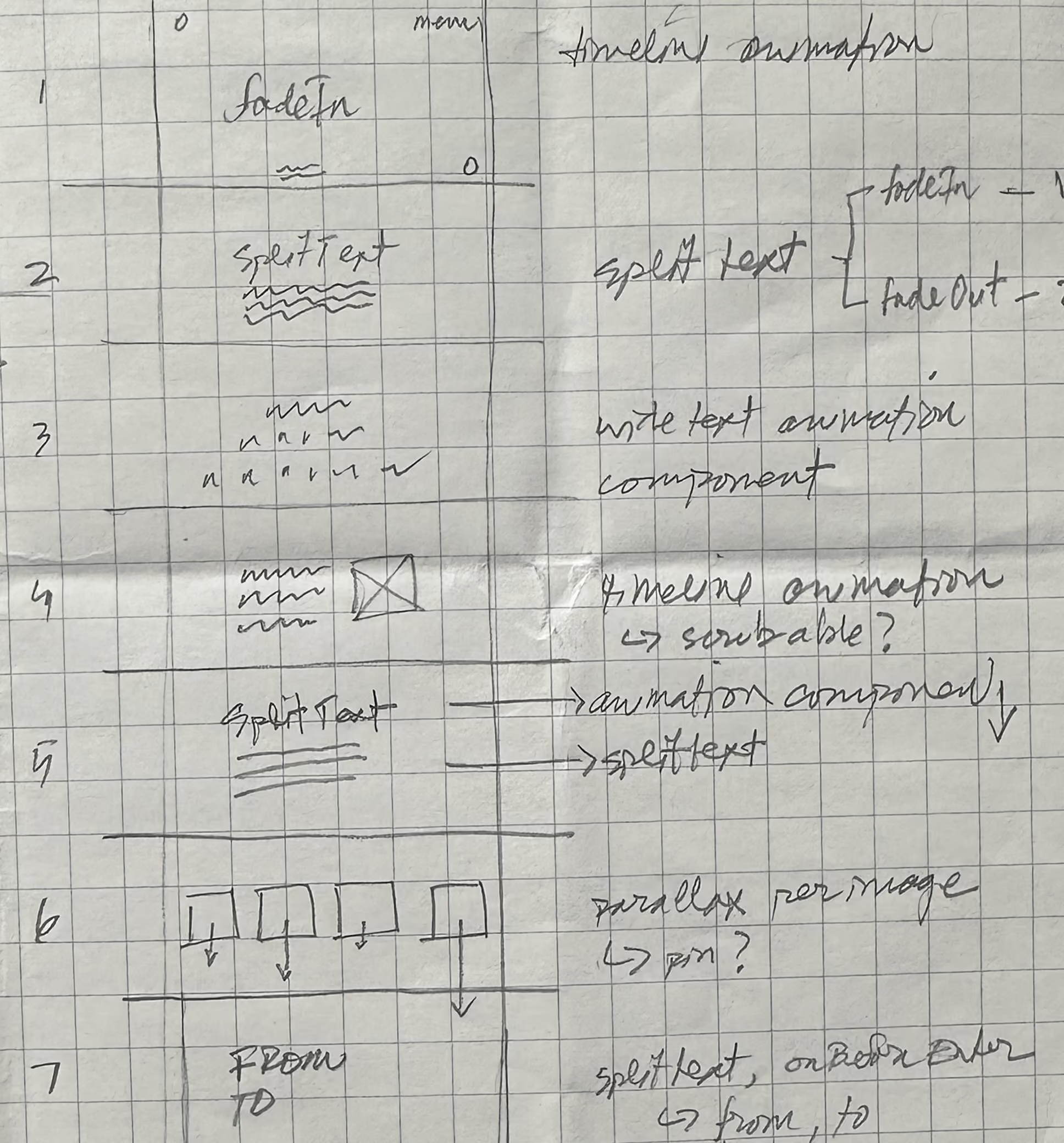
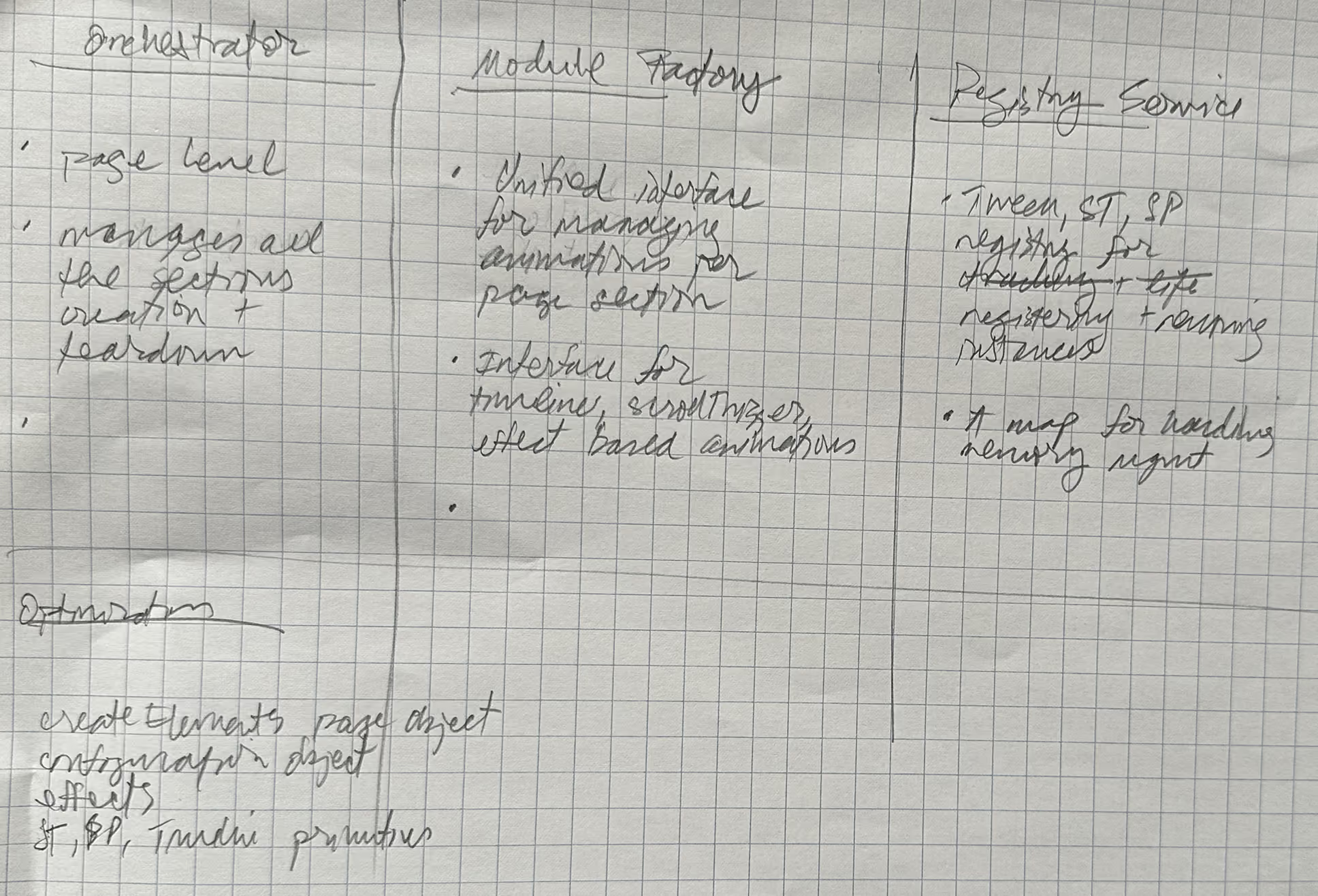
This turned into:
After a couple of days, I started the refactoring process and noticed that GSAP code has 3 flavors:
- timeline based animations triggered by scroll
- scroll trigger animations for single or multiple elements coming into view
- specific motion effects for text and images that were more self-contained components
Instead of a long file full of code, I wanted to separate each section into it’s own file, implement consistent patterns for GSAP setup and animations, and have one single “timeline scroll” orchestrator for all the sections. This would make it easier to make order changes and remove change complexity for each “frame”.
Storyboard and Configuration
When reading through Josh Puckett’s InterfaceCraft he mentioned two important patterns for crafting animations: Storyboard and Configuration. We can pair them together to improve documentation and fine tuning our animations.
The storyboard template presents an overview of what is happening in the visual animation, which is helpful when you have lots of page sections doing things. I use this pattern for describing time and scroll based animations like this:
/* ─────────────────────────────────────────────────────────
 * HEADER STORYBOARD
 *
 *    0ms   titles cleared to play
 *  500ms   headline lines slide in, alternating (cascade)
 * +500ms   tagline fades in
 * −250ms   hint overlaps tag
 * −500ms   icon overlaps hint
 *    end   full header on stage
 *
 * ─────────────────────────────────────────────────────────
 *
 * PATTERN: MASTER TIMELINE drives 4 nested timeline animations
 *
 *
 * ───────────────────────────────────────────────────────── */
This gives us a solid overview of what the animation does. The same can work for scroll based animations:
/* ─────────────────────────────────────────────────────────
 * SECTION 5 STORYBOARD
 *
 *  top 70%→20%   body lines rise in, blur clears, staggered
 * center→center  title chars slot-roll in, document order
 *
 * ─────────────────────────────────────────────────────────
 *
 * PATTERN: ScrollTrigger scrubs line waterfall + textRoll effect on title
 * CSS: .anim-mask on title; line masks via SplitText; dual-span yPercent per char
 *
 * ───────────────────────────────────────────────────────── */
The configuration pattern moves our DOM selectors and CSS properties to an object that gives us one control panel:
const HEADER_CONFIG = {
  SELECTORS: {
    HEADER: ".page-header",
    ICON: ".page-header__icon",
    TAG: ".page-header__tag",
    HINT: ".page-header__hint",
    HEADER_TITLES: ".page-header__titles",
    HEADER_TITLE: ".page-header__titles h1",
  },
  HEADER: {
    TIMELINE: {
      opacity: 1,
      duration: 0.5,
      ease: EASEOUTQUAD,
    },
  },
  TAG: {
    TIMELINE: {
      opacity: 1,
      duration: 0.5,
      ease: EASEOUTQUAD,
    },
  },
  HINT: {
    TIMELINE: {
      opacity: 1,
      duration: 0.5,
      ease: EASEOUTQUAD,
    },
  },
  ICON: {
    TIMELINE: {
      opacity: 1,
      duration: 0.5,
      ease: EASEOUTQUAD,
    },
  },
  HEADER_TITLE: {
    SPLIT_TEXT: {
      type: "lines",
      mask: "lines",
      linesClass: "page-header-lines",
    },
    TIMELINE: {
      yPercent: 0,
      duration: 1,
      ease: EASEOUTQUAD,
      stagger: 0.02,
    },
  },
};
We could further remove inline values to another object for repeated values for opacity, duration and so forth. But this reads just fine and avoids getting too abstract.
This is similar to defining a set of tokens in css for controlling the design system except now for the animations instead.
The code below is for the opening animation on page load.
Before
document.fonts.ready.then(() => {
  const hero = document.querySelector(".page-header");
  const heroIcon = hero.querySelector(".page-header__icon");
  const heroTag = hero.querySelector(".page-header__tag");
  const heroHint = hero.querySelector(".page-header__hint");
  const heroHeaders = hero.querySelectorAll(".page-header__titles h1");

  const heroTimeline = gsap.timeline();
  const iconTimeline = gsap.timeline();
  const tagTimeline = gsap.timeline();
  const hintTimeline = gsap.timeline();

  function removePrehideClasses(...elements) {
    elements.forEach((el) => el.classList.remove("anim-prehide"));
  }

  iconTimeline.to(heroIcon, {
    opacity: 1,
    duration: 0.5,
    ease: EASEOUTQUAD,
  });

  tagTimeline.to(heroTag, {
    opacity: 1,
    duration: 0.5,
    ease: EASEOUTQUAD,
  });

  hintTimeline.to(heroHint, {
    opacity: 1,
    duration: 0.5,
    ease: EASEOUTQUAD,
  });

  const headerLines = new SplitText(heroHeaders, {
    type: "lines",
    mask: "lines",
    linesClass: "page-header-lines",
  });

  hero.querySelector(".page-header__titles").classList.remove("anim-prehide");

  headerLines.lines.forEach((line, i) => {
    const position = i + 1;

    const lineCount = position % 2 === 0 ? position : 0;

    gsap.set(line, {
      yPercent: lineCount ? -100 : 100,
    });

    gsap.to(line, {
      yPercent: 0,
      duration: 1,
      stagger: 0.02,
      ease: EASEOUTQUAD,
    });
  });

  heroTimeline
    .call(removePrehideClasses, [heroIcon, heroTag, heroHint])
    .add(tagTimeline, "+=.5")
    .add(hintTimeline, ">-.25")
    .add(iconTimeline, ">-.5")
    .play();
After
import gsap, { SplitText } from "../shared/gsap.js";
import { createRegistry } from "../shared/registry.js";
import { removePrehideClasses } from "../utils.js";
import { EASEOUTQUAD } from "../easings.js";

/* ─────────────────────────────────────────────────────────
 * HEADER STORYBOARD
 *
 *    0ms   titles cleared to play
 *  500ms   headline lines slide in, alternating (cascade)
 * +500ms   tagline fades in
 * −250ms   hint overlaps tag
 * −500ms   icon overlaps hint
 *    end   full header on stage
 *
 * ─────────────────────────────────────────────────────────
 *
 * PATTERN: MASTER TIMELINE drives 4 nested timeline animations
 *
 *
 * ───────────────────────────────────────────────────────── */

const HEADER_CONFIG = {
  SELECTORS: {
    HEADER: ".page-header",
    ICON: ".page-header__icon",
    TAG: ".page-header__tag",
    HINT: ".page-header__hint",
    HEADER_TITLES: ".page-header__titles",
    HEADER_TITLE: ".page-header__titles h1",
  },
  HEADER: {
    TIMELINE: {
      opacity: 1,
      duration: 0.5,
      ease: EASEOUTQUAD,
    },
  },
  TAG: {
    TIMELINE: {
      opacity: 1,
      duration: 0.5,
      ease: EASEOUTQUAD,
    },
  },
  HINT: {
    TIMELINE: {
      opacity: 1,
      duration: 0.5,
      ease: EASEOUTQUAD,
    },
  },
  ICON: {
    TIMELINE: {
      opacity: 1,
      duration: 0.5,
      ease: EASEOUTQUAD,
    },
  },
  HEADER_TITLE: {
    SPLIT_TEXT: {
      type: "lines",
      mask: "lines",
      linesClass: "page-header-lines",
    },
    TIMELINE: {
      yPercent: 0,
      duration: 1,
      ease: EASEOUTQUAD,
      stagger: 0.02,
    },
  },
};

export function createHeader() {
  const registry = createRegistry();

  const createTimeline = () => {
    registry.resetAnimations();

    const header = document.querySelector(HEADER_CONFIG.SELECTORS.HEADER);
    const headerIcon = header.querySelector(HEADER_CONFIG.SELECTORS.ICON);
    const headerTag = header.querySelector(HEADER_CONFIG.SELECTORS.TAG);
    const headerHint = header.querySelector(HEADER_CONFIG.SELECTORS.HINT);
    const headerHeaders = header.querySelector(
      HEADER_CONFIG.SELECTORS.HEADER_TITLES,
    );

    const headerTimeline = gsap.timeline();
    const iconTimeline = gsap.timeline();
    const tagTimeline = gsap.timeline();
    const hintTimeline = gsap.timeline();
    const linesTimeline = gsap.timeline();

    registry.addTimeline(headerTimeline);

    iconTimeline.to(headerIcon, HEADER_CONFIG.HEADER.TIMELINE);
    tagTimeline.to(headerTag, HEADER_CONFIG.TAG.TIMELINE);
    hintTimeline.to(headerHint, HEADER_CONFIG.HINT.TIMELINE);

    const headerLines = new SplitText(
      headerHeaders.querySelectorAll(HEADER_CONFIG.SELECTORS.HEADER_TITLE),
      HEADER_CONFIG.HEADER_TITLE.SPLIT_TEXT,
    );

    registry.addSplit(headerLines);

    headerLines.lines.forEach((line, i) => {
      const position = i + 1;
      const fromY = position % 2 === 0 ? position * -100 : 100; // your logic
      gsap.set(line, { yPercent: fromY });
    });

    linesTimeline.to(headerLines.lines, HEADER_CONFIG.HEADER_TITLE.TIMELINE);

    /**
     * Play animation on initial page load
     */
    headerTimeline
      .call(removePrehideClasses, [headerHeaders])
      .add(linesTimeline, "+=0.5")
      .add(tagTimeline, "+=.5")
      .add(hintTimeline, ">-.25")
      .add(iconTimeline, ">-.5")
      .call(removePrehideClasses, [headerIcon, headerTag, headerHint])
      .play();
  };

  return {
    id: "header-section",
    type: "timeline",
    registry,
    create: createTimeline,
    destroy() {
      registry.destroy();
    },
    revert() {
      registry.resetSplits();
    },
  };
}
Yes, there is more code here, but we have improved documentation and a pattern we can apply to the other frames for consistency.
Fine Tuning Animations
The idea of emergent design occurs as we are writing the code and making connections between the different parts of the javascript and the layers (html, css, js). These two patterns are super helpful for maintaining animation code.
Emil Kowalski notes how important recording our animations can be for improving those subtle timings. The configuration pattern can simplify and speed up that fine-tuning process.
Once you get the animation code written and start reviewing it, the configuration pattern can reduce the feedback loop between IDE and the Browser. Searching through a long spaghetti code file is tedious and can break the flow. Each section in the mono-file might have it’s own setup and animation code that is different from the others.
A configuration object gives us an animation control panel for easier edits in one place. When we apply this pattern to all the animation sections, it gives provides a reliable pattern for all the frame animation code.
Main Points
- storyboard pattern for documenting time/scroll based code flows, provides an animation vocabulary
- configuration pattern for easier animation changes, similar to css tokens for theming
- reduce the feedback between IDE and the Browser
- add structure and form to the code for future maintenance